Bhoomi, RTC & Mutation: Check Land Ownership Online in Karnataka 2026
Based on Karnataka's Bhoomi, Dishaank, e-Swathu and Kaveri systems, July 2026 — confirm records on the official portals and verify title with an advocate.
Before you pay for a plot, you want to know one thing for certain: who really owns the land, and how it came to them. Karnataka puts most of that on the internet — the RTC on the Bhoomi portal, the mutation history in the revenue records, boundaries on the Dishaank map, panchayat property records on e-Swathu, and the transaction trail in the encumbrance certificate on Kaveri. Used together, these let a buyer in Vijayapura, Devanahalli or anywhere in the state verify ownership before spending a rupee. This guide explains what each record shows and how to read them in the right order.
A single record never tells the whole story. Agricultural land lives in the RTC; a converted plot lives in the Khata and e-Swathu; and the deed history sits in the encumbrance certificate. The skill is knowing which record applies to the land in front of you and cross-checking them, so a mismatch surfaces before you sign. This is the online half of the wider check set out in our plot due-diligence checklist.
Karnataka Land Records 2026 — What to Check Where
| Record | What it shows | Where |
| RTC / Pahani | Owner, survey number, extent, land type | Bhoomi portal |
| Mutation (MR) | Chain of ownership changes | Bhoomi / revenue records |
| Boundaries | Survey-number map on the ground | Dishaank app |
| Khata & Form 9/11 | Plot ownership in a layout | e-Swathu / local body |
| Encumbrance (EC) | Registered transactions & charges | Kaveri portal |
Indicative, as of July 2026 — portal names, URLs and record formats are set by the state and change periodically; always read the record on the official portal and verify title with an advocate.
RTC / Pahani on the Bhoomi Portal
For agricultural land, the RTC — the Record of Rights, Tenancy and Crops, or Pahani — is the starting record. On the Bhoomi land records portal you enter the district, taluk, hobli, village and survey number and pull up the RTC, which names the owner, the extent, the land classification and the crop details. The RTC is where you confirm that the person selling the parent land is the recorded owner and that the extent matches what is on offer.
Reading the Mutation (MR) History
The RTC shows today's owner; the mutation register shows how the land got there. Each sale, gift or inheritance is recorded as a mutation, and reading the sequence reveals the chain of title. A clean, unbroken chain is reassuring; a gap, an overlapping claim or a pending mutation is a signal to stop and investigate. The mutation history is one of the strongest early filters, because most title problems show up as an odd entry in this record before they show up anywhere else.
Dishaank, e-Swathu and the Encumbrance Certificate
Three more records complete the picture. The Dishaank app plots a survey number on a cadastral and satellite map, so you can stand on the land and confirm its boundaries match. For a converted plot in a layout, ownership sits not in the RTC but in the Khata and the e-Swathu Form 9 and 11, which is also the basis for property tax. And the encumbrance certificate on Kaveri lists every registered transaction and charge — the deed trail covered in our encumbrance certificate guide.
From Agricultural Record to Plot Record
The single most useful idea is that the record changes when the land does. Raw farmland is tracked by survey number in the RTC. Once it is converted and a layout is sanctioned, individual plots are tracked by Khata and e-Swathu, not by RTC. So for a plot in an approved layout you verify the Khata, the mother deed, the encumbrance certificate and the layout sanction — and use the RTC and mutation only to check the parent land's history. Matching a plot to the wrong record is the most common beginner mistake.
Records Example — Bulwark The Woodland Forest
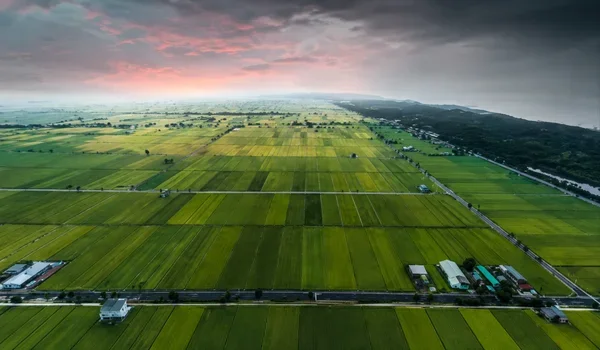
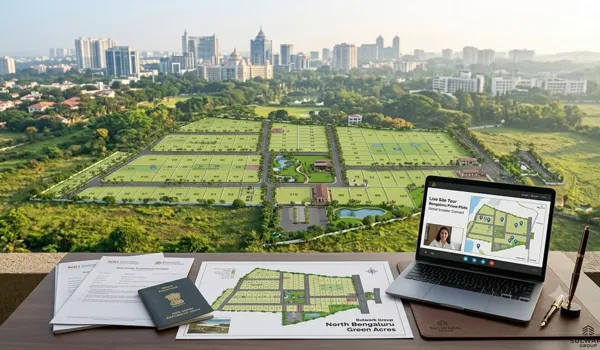
Bulwark The Woodland Forest is a 53-acre plotted township by Bulwark Group in Vijayapura, Devanahalli, registered under Karnataka RERA as PRM/KA/RERA/1251/446/PR/090626/008712. For a plot in a sanctioned layout like this, a buyer checks the parent land's RTC and mutation history, then the plot's Khata, encumbrance certificate and layout sanction.
- Parent land: RTC and mutation history for the survey numbers on Bhoomi
- Boundaries: Dishaank to confirm the layout's location on the map
- Plot record: Khata and e-Swathu Form 9 / 11 for the individual plot
- Transaction trail: encumbrance certificate on Kaveri, plus RERA registration
See the current price list, then book a site visit to walk through the record set for a specific plot.
Frequently Asked Questions
1. How do I check land ownership online in Karnataka?
For agricultural land you check the RTC or Pahani on the Bhoomi portal, which shows the owner, survey number, extent and land type. For a converted plot in a layout you check the Khata and the e-Swathu Form 9 and 11, and you check the encumbrance certificate on Kaveri for the transaction history. Together these confirm who owns the land and how it has changed hands.
2. What is an RTC or Pahani?
The RTC, also called Pahani, is the Record of Rights, Tenancy and Crops for agricultural land in Karnataka. It lists the owner's name, the survey number, the area, the land classification and crop details, and it is the primary online record for verifying farmland ownership on the Bhoomi portal.
3. What is a mutation extract?
A mutation extract, or MR, records a change of ownership in the revenue records after a sale, gift or inheritance. Reading the mutation history shows how the land moved from one owner to the next, so a break or a disputed entry in the chain is a warning sign to investigate before you buy.
4. What is the Dishaank app?
Dishaank is Karnataka's map application that shows survey-number boundaries on a cadastral and satellite map. It lets you locate a survey number on the ground and check that the plot's position and boundaries match the records, which helps confirm you are looking at the right parcel.
5. Are RTC records enough to verify a plot?
No. The RTC covers agricultural land. Once land is converted and laid out as plots, ownership shifts to the Khata and e-Swathu records, and the transaction history sits in the encumbrance certificate on Kaveri. For a plot you should read the Khata, the EC, the mother deed and the mutation history together, ideally with an advocate.
6. Can online records replace a legal title check?
Online records are the starting point, not the whole check. They tell you what the government records show today, but a full title verification traces the deeds over many years, confirms the approvals and reads the encumbrance certificate. Use the portals to shortlist and flag issues, then have an advocate verify the title before you pay.
Conclusion
Karnataka lets you verify land ownership online before you commit: read the RTC and mutation history on Bhoomi for the parent land, confirm boundaries on Dishaank, check the Khata and e-Swathu for a converted plot, and pull the encumbrance certificate on Kaveri for the deed trail. The key is matching the land to the right record — farmland to the RTC, a layout plot to the Khata — and cross-checking them so a mismatch surfaces early. Online records shortlist and flag; an advocate then verifies the title. To walk through a real plot's record set, book a site visit.
Bulwark The Woodland Forest Blog